Switch to Open To Close

Already running your business somewhere else? You do not have to start over.

Bring Your System With You

Moving to Open To Close does not mean manually rebuilding everything your business already uses.

Open To Close includes AI-powered migration tools designed to read and interpret the systems you already have, including your custom fields, task checklists, email templates, contacts, teams, users, workflows, and other operational content.

You give Ollie what you already have. Ollie helps build it inside Open To Close.
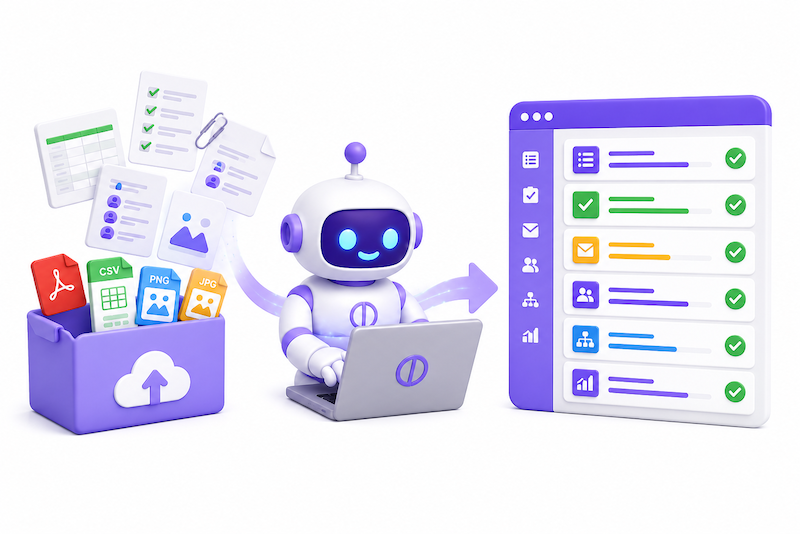
Switching Really Is This Simple

Upload what you already use. Let Ollie do the heavy lifting.

1. Export or Upload

Upload the files that contain your existing system. Ollie can work with PDF, CSV, PNG, and JPG files.

2. Ollie Reads It

Ollie analyzes your content and identifies the structure, fields, tasks, emails, contacts, users, teams, workflows, and other information it contains.

3. Review the Results

Open To Close shows you what Ollie created before anything is added. Review it, make changes, remove anything you do not want, or adjust the structure.

4. Add It to OTC

When everything looks right, import the generated content directly into your Open To Close account and keep building from there.

That's It.

No manually recreating hundreds of tasks. No retyping every custom field. No rebuilding every email one at a time. Upload it, let Ollie interpret it, review the results, and add it to Open To Close.

What Can Ollie Help You Rebuild?

If you can export it, print it, screenshot it, or save it as a file, there is a good chance Ollie can help you turn it into something usable inside Open To Close.

Custom Fields

Upload your current field lists, spreadsheets, screenshots, or exports and Ollie can identify your fields and prepare them for your Open To Close account.

Task Templates

Upload your transaction checklists or task exports and Ollie can interpret task names, timing, milestones, responsibilities, and workflow structure.

Email Templates

Give Ollie your existing emails and communication templates and it can help reconstruct reusable email templates for your Open To Close workflow.

Contacts

Upload contact lists and exports so Ollie can help organize the people and businesses your operation already depends on.

Teams & Users

Bring over the structure of your organization so you can recreate your teams, users, assignments, and operational responsibilities inside Open To Close.

Processes & Workflows

Upload SOPs, checklists, screenshots, process documents, and other materials and use Ollie to help translate how your business currently operates into Open To Close.

Bring Us Your PDF, CSV, PNG, or JPG

You do not need a perfect migration file.

Ollie Can Work With What You Already Have

Your old system may give you a CSV export. Your checklist may only exist as a PDF. Your process may be documented in screenshots. Your email templates may be sitting in a document.

That is exactly why we built AI into the migration process.

Instead of requiring your old platform to provide a perfect Open To Close-compatible export, Ollie reads the content itself and helps interpret what that information should become inside your account.

Supported Migration Content

  • PDF documents
  • CSV exports
  • PNG screenshots and images
  • JPG screenshots and images
  • Task and checklist exports
  • Email template documents
  • Custom field lists
  • Contact exports
  • Team and user lists
  • Process documentation and SOPs

From Your Old System to Open To Close

Export it. Screenshot it. Save it as a PDF. Upload it to Ollie.

Ollie reads it, interprets it, builds the content for Open To Close, and gives you the opportunity to review everything before it is added to your account.

Switching systems should not require rebuilding your business by hand.

Try Open To Close FREE for 30 days!

Take a test run to see how Open To Close can power your transaction workflow.